

WHITE RISK Mobile
Mobile User Interface | UX Design
WHITE RISK Mobile is a mobile user interface concept for the
redesign of the
WHITE RISK learning platform, which can currently only be used via
desktop. In addition to the redesign of the user interface, a
proposal in form of a Figma click-dummy prototype was made to
improve the overall user and e-learning experience, by basing the
different learning materials on 360-degree images of real-world
situations.
I developed this work at the Zurich University of the Arts as
part of my bachelor studies in Interaction Design. The project was
brought to life by the collaboration partner, the Institut für
Schnee und Lawinenforschung short SLF.
The SLF maintains a desktop platform called WHITE RISK, where one
can plan snowshoe and ski tours
as well as expand, deepen, or test one's knowledge about
avalanches. These so called LEARN & EXPLORE areas used for
knowledge transfer, are not
usable on mobile devices since they are quiet old and not
responsive.
In the process, I applied different methods. Among them were: desk
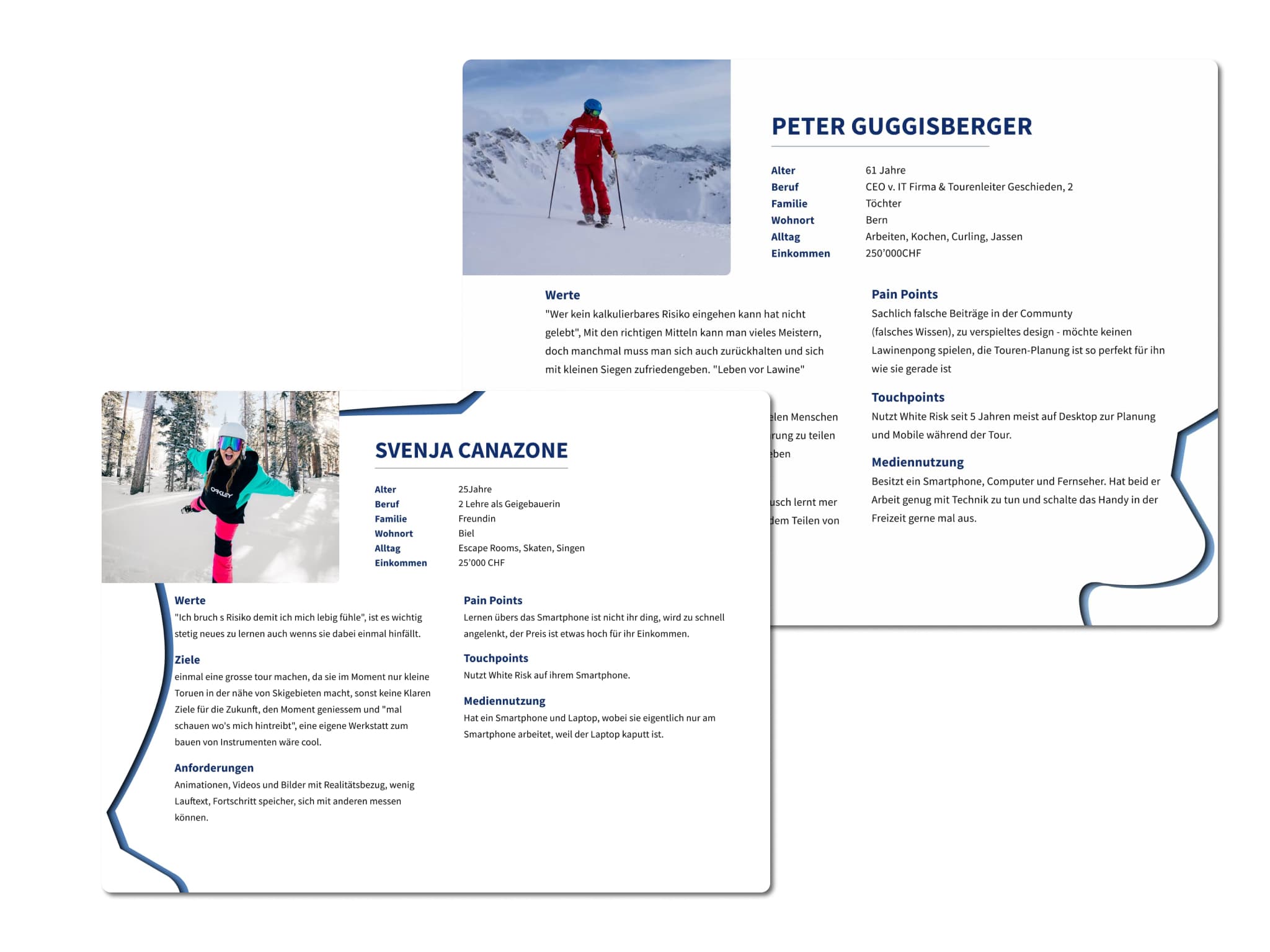
research, interviews with users, stakeholder maps, personas and
user journeys. It turned out that effective exposure to a
real-life situation seems to be the best training tool. Therefore,
I decided to base my concept on real locations in the form of a
360-degree view related to each learning task.
For the click dummy, I worked with sketches, mooboards, wireflow
diagrams and wireframes in Figma.
Year
2021




Problem Statement
The EXPLORE & LERAN sections of the WHITE RISK platform are not useable on mobile devices. However, acquiring or renewing knowledge about the formation of avalanches is a primary preventive measure to avoid accidents. The collaboration partner sees great potential to increase user engagement and knowledge retention by redesigning the educational exercises and integrating them into an attractive mobile e-learning experience.
Role
I worked on this project on my own, yet I regularly shared ideas with a group of fellow students to gather different perspectives.
Research
Beginning the Project, I focused on desk research on the topics of avalanches, e-learning and learning methods in general. I analyzed existing e-learning applications to get an impression of successful workflows and designs.
Goal
My goal in this project was to offer the collaboration partner an idea for a new way of communicating their educational content as well as to test and expand my methodological skills when redesigning the platform.


Interviews
To broaden my insights, I conducted qualitative interviews with
users of the desktop platform. Since my interview
partners differed greatly in their knowledge of the platform and
avalanches, I adapted the interview questions appropriately.
How Might We ...?
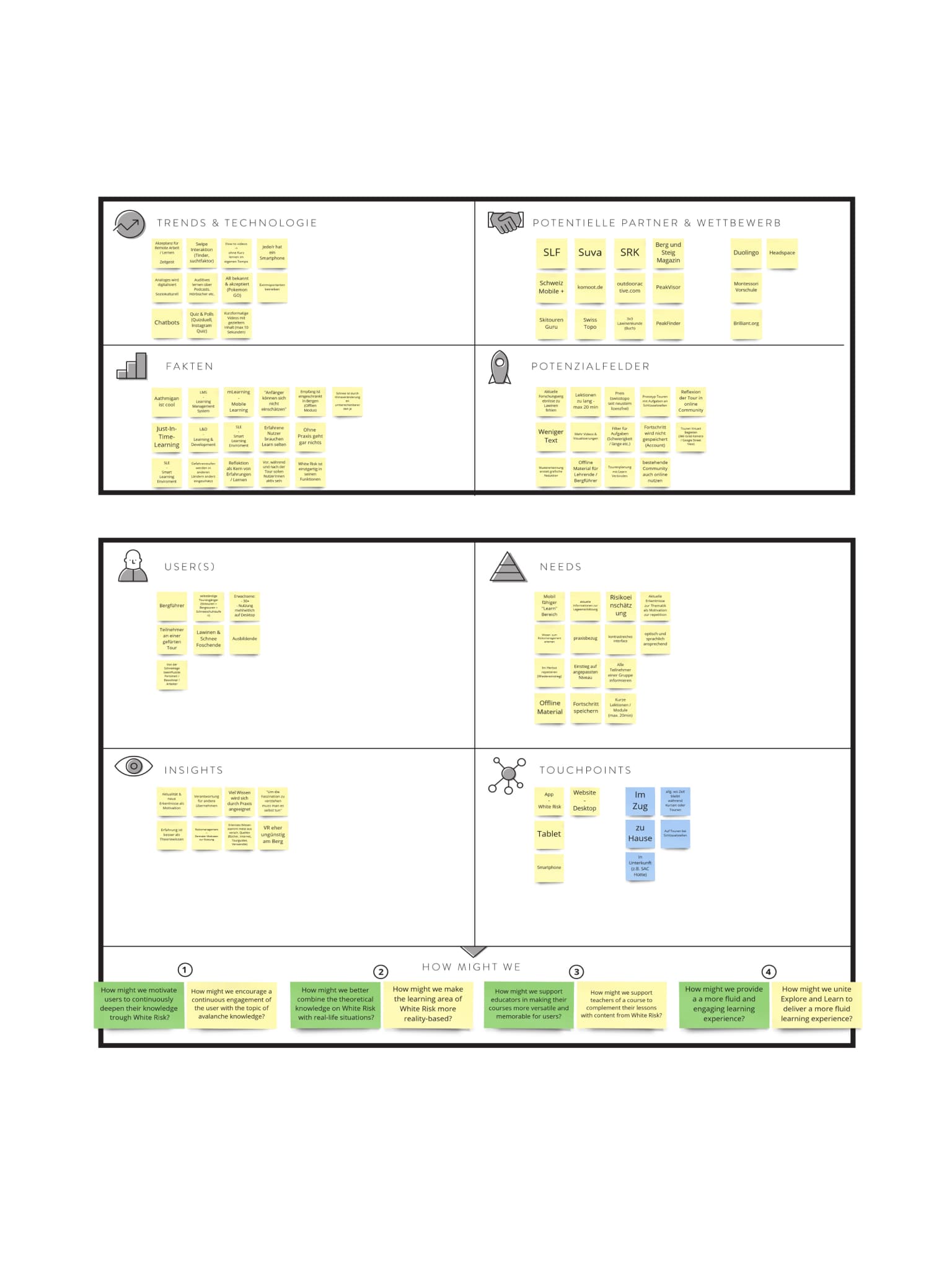
Following the interviews, I focused on other methods. Among them were the Stakeholder Map, Personas and User Journey. These tools helped me to formulate the "How Might We Questions", according to the methodology of the Digital Innovation Playbook by Dark Horse Innovation.

I formulated 4 questions, of which I chose one to narrow down the scope.
How might we combine the theoretical knowledge on WHITE RISK with real-life situations?
I chose this question because the desire for theory to be more
grounded within reality was a recurring theme in the interviews.
This "How Might We Question" guided me in the further process and
helped me to
limit myself.
Ideation
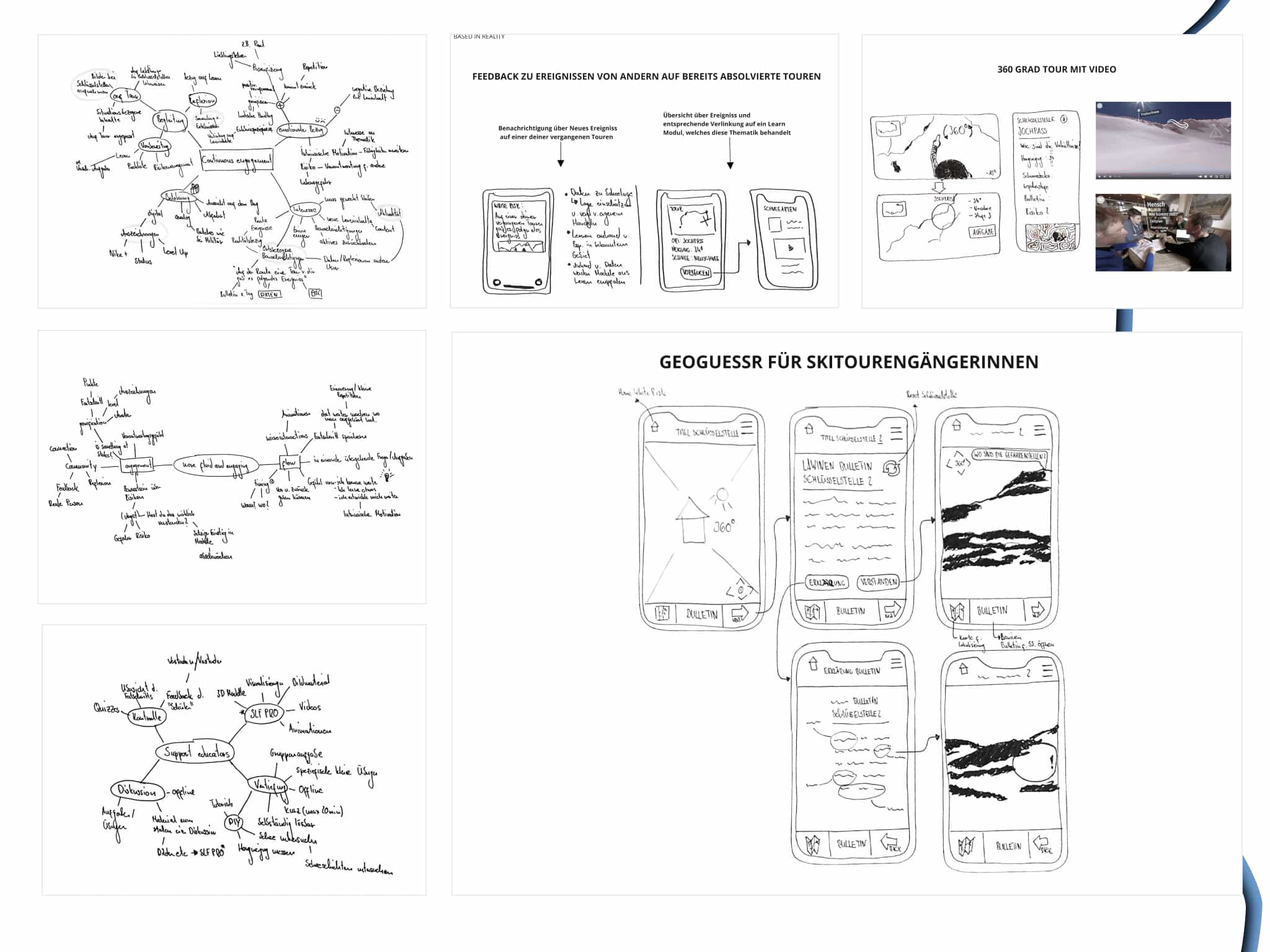
In the next phase, I worked on finding solutions to my "How Might We Question" and evaluating them using a digital innovation board. I came up with three solutions to the reality-based question. To find these ideas, I mainly worked with the method of brainwriting and brainstorming.
Evaluation of Ideas
The evaluation of the possible implementation of my ideas
consisted mainly in a more detailed elaboration through
wireframes. These helped me to visualize my actual intentions of
the application and to make them understandable for
myself and of course for others.
While creating the first hand drawn, small wireframes, I decided
that a
360 degree view would be the centerpiece of th learning experience
I wanted to create.
The 360 degree view offers the possibility of being directly
immersed in a place that you didn't know before and the
possibility of linking specific tasks to a real place, with the
result that users will be able to remember better.
Wireflow
Since I was not quite sure about the workflow of my prototype, I created a first wireflow diagram as a hand sketch. Working with hand sketches helps me not to go into too much detail, but to think roughly. The diagram shows the interaction paths between the main page with different topics / locations, their content and flow. It does not considered all possible interactions as for example "back".

Mockup
I implemented this wireflow diagram in an initial rough, functional Figma mockup so that I could present my general idea to the collaboration partner.
Moodboard & Skin
After clarifying the process and successfully communicating my idea, I began tackling the actual design of the screens and skin. For this purpose, I created several small mood boards with the goal of finding the appropriate colors and fonts. I tested as wide a range of color combinations and gradients as possible, as I personally am still working considerably on my ability to choose colors and fonts.

I revised the design several times, incorporating feedback from different parties.
Final Prototype
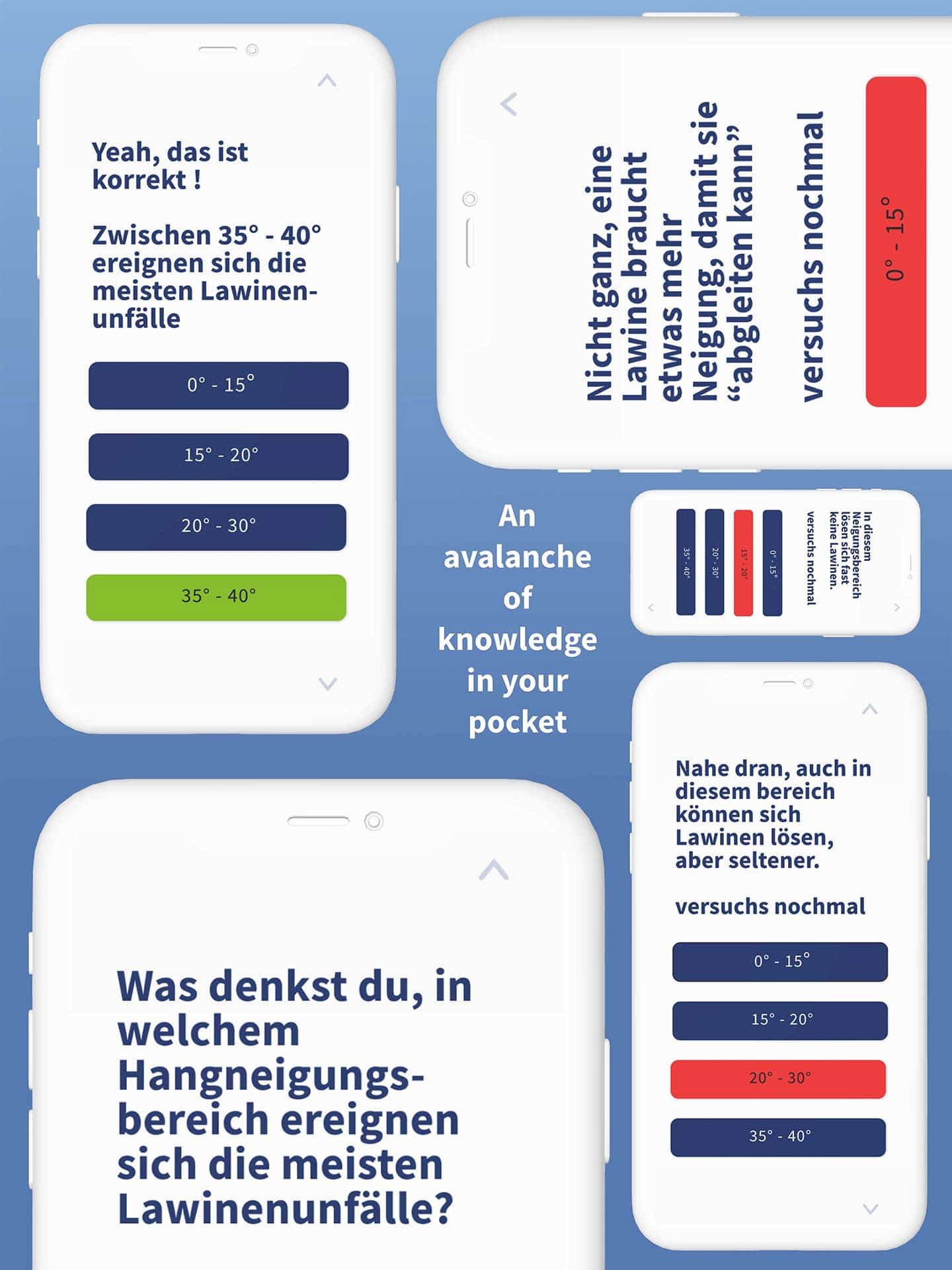
My example screens of the prototype focus on the flow of a so-called "learning scenario". A learning scenario always starts with a 360 degree view of a location. Fitting exercises are assigned to this location. The necessary theory is interwoven in intermediate sequences. The chosen learning scenario of the prototype deals with the topic of slope inclination and works with the 360 degree view of the Ducan glacier in Davos. By tapping the buttons or swiping up and down, the user can easily switch between the screens.
User Testings
The click dummy prototype has been tested on several external people in short user tests, but not yet with users of the WHITE RISK platform. The 360-degree view did not fail to impress, with users spending most of the time looking closely at the location before engaging in the highlighted activity.
